IBM Cloud · 2018

Platform Unification Project (PUP)

This may have been the hairiest design and development effort we’d ever undertaken. Alongside the best team that could be imagined, we delivered and then some.

2 platforms → 1 experience
SoftLayer Control Portal and IBM Cloud console unified into a single IaaS + PaaS experience for customers · three internal IBM awards + 2019 Stratus Award for Cloud Computing
RoleDesign lead, account & billing experience
ScopeBluemix + SoftLayer → one IBM Cloud
RecognitionIBM Corporate Technical Award · IBM OTAA · 2019 Stratus Award for Cloud Computing
CollaboratorsAngela Runge (user research) · the IBM Cloud platform design, engineering, PM, and customer-facing teams across multiple geographies

Problem

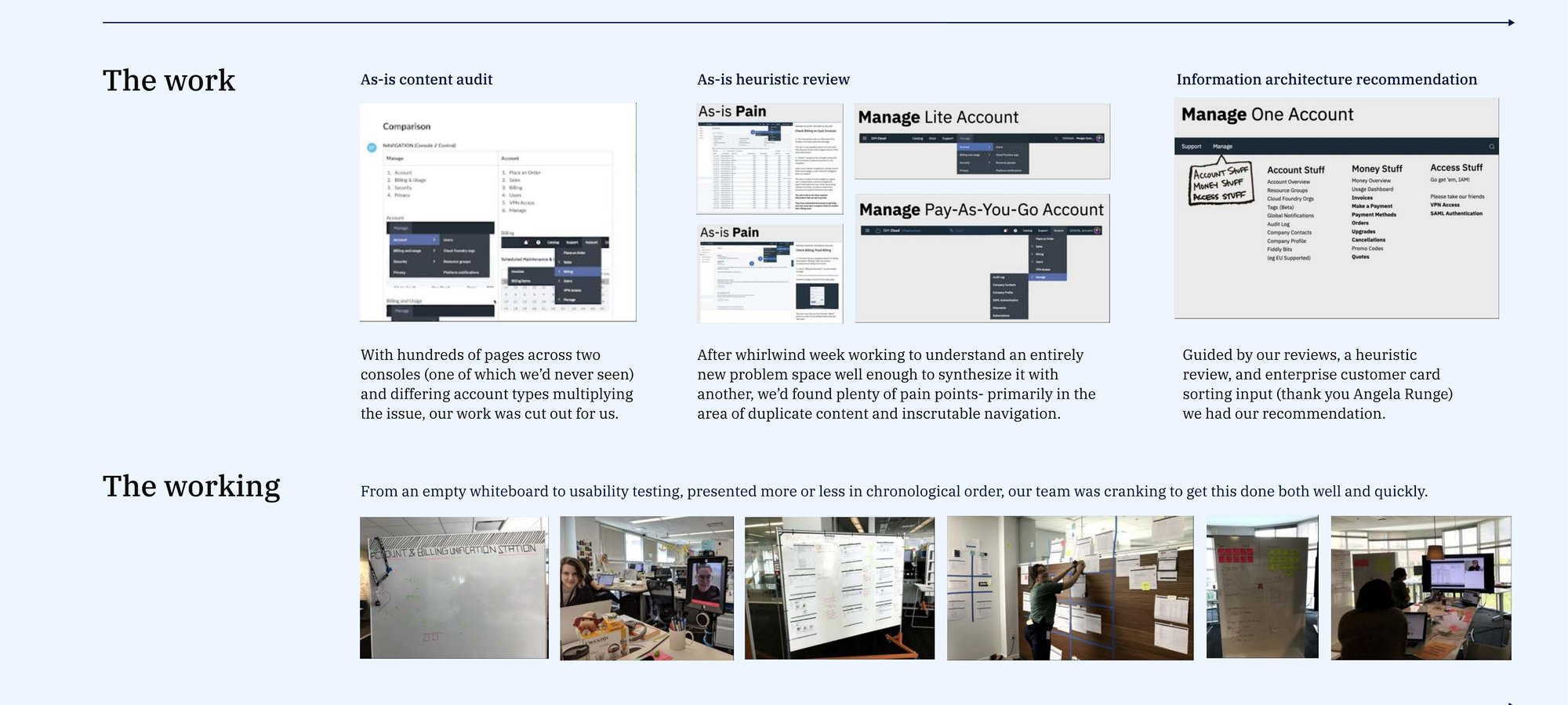
After IBM acquired SoftLayer, customers were stuck with two separate consoles, two separate account models, and two divergent visual languages. Hundreds of pages across two consoles (one of which our team had never even seen), and differing account types multiplying the issue. Customers thought of “IBM Cloud” as one thing — but it wasn’t.

Insight

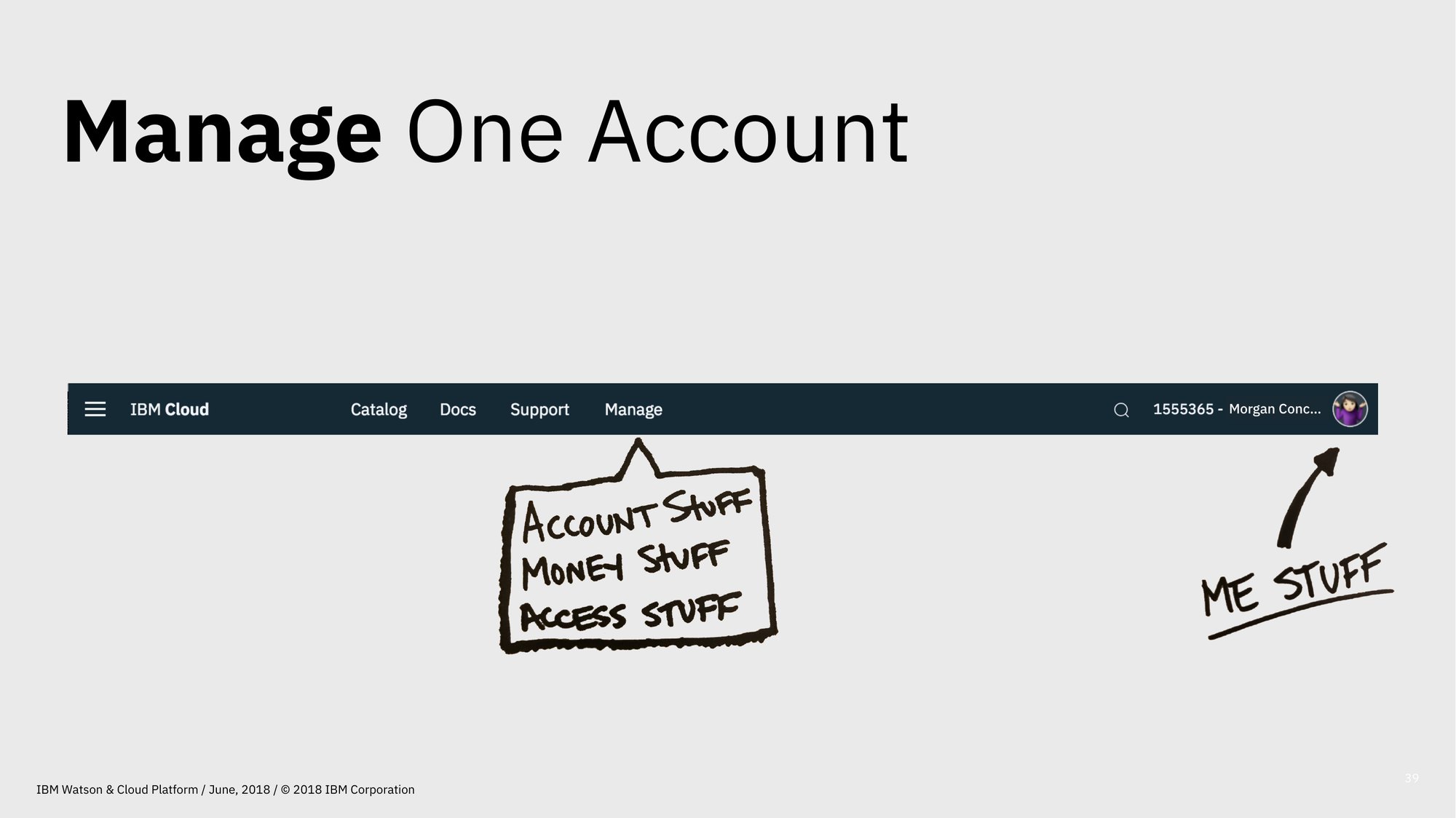
This wasn’t a technical reconciliation problem — it was an information-architecture one. A whirlwind week of content audit, heuristic review, and enterprise card-sorting (thank you, Angela Runge) made the shape of the unified product visible: Account Stuff · Money Stuff · Access Stuff. Once the IA was named, the engineering reconciliation had a target.

Solution

One unified account, billing, and access experience for IBM Cloud — built from the IA recommendation up, iterated through usability testing, and shipped globally. The launch day brought celebrations on the same timezone-spanning Slack channel from Durham/RTP, Austin, Rome, Toronto/Markham, and Beijing.

Sizing the problem

From the June 2018 design opinion check-in to the cross-functional leadership team — the audit that made the size of the unification problem nameable.
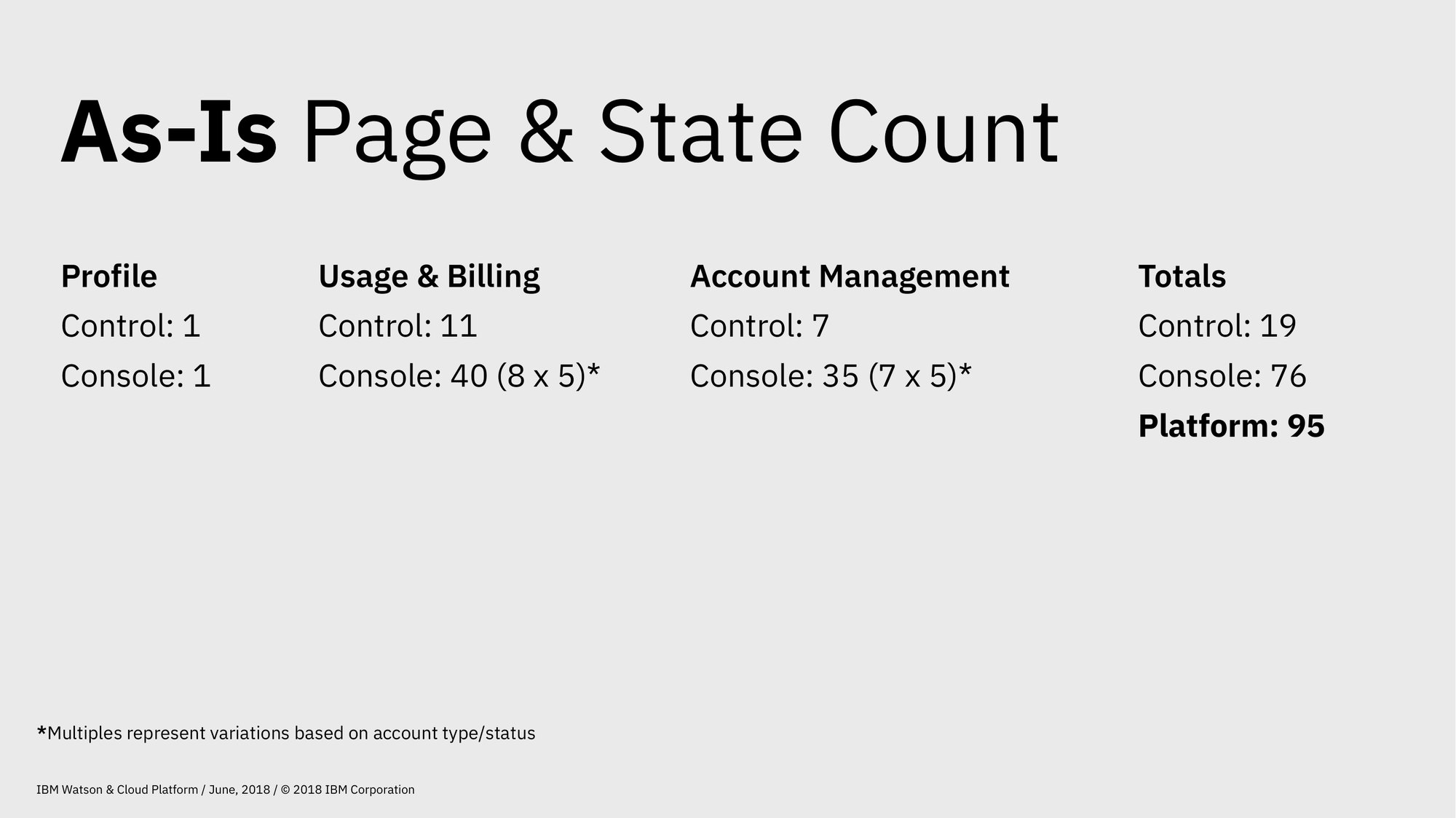
A presentation slide titled 'As-Is Page & State Count' showing three columns — Profile (1+1), Usage & Billing (11 control + 40 (8×5) console), Account Management (7 control + 35 (7×5) console) — totaling 19 control and 76 console pages for a Platform total of 95 pages. A footnote notes the multiples represent variations based on account type/status.
As-is page and state count. 95 pages across the two consoles, before unification.

Naming the answer

Three sticky-note groupings produced from a week of card-sorting with enterprise customers — benchmarked against AWS, GCP, and Azure to confirm the mental model.
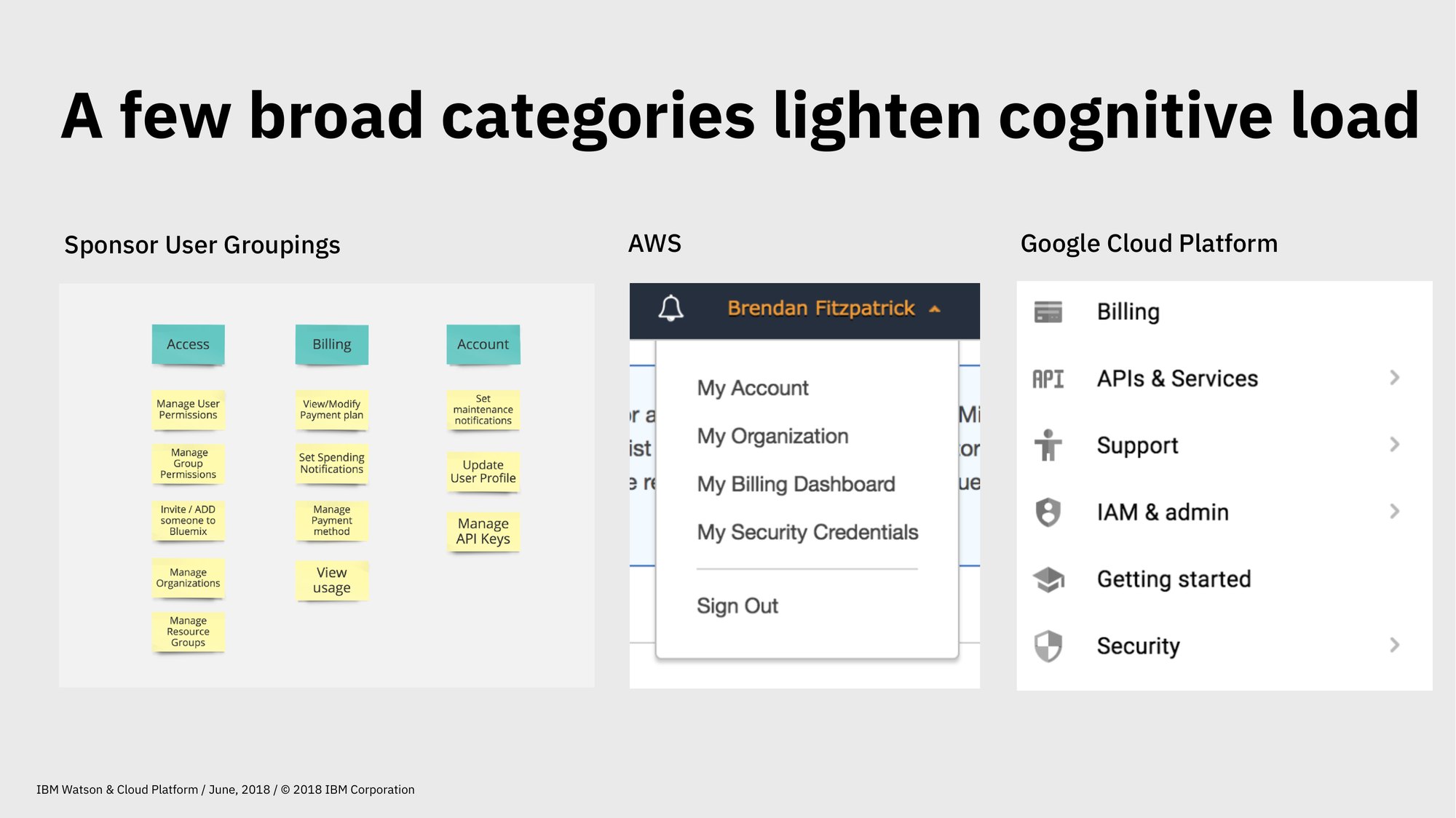
A slide titled 'A few broad categories lighten cognitive load.' Three artifacts side by side: Sponsor User Groupings showing yellow sticky notes grouped under Access / Billing / Account; an AWS account dropdown showing My Account / My Organization / My Billing Dashboard / My Security Credentials / Sign Out; and a Google Cloud Platform navigation showing Billing, APIs & Services, Support, IAM & admin, Getting started, Security.
A few broad categories lighten cognitive load — the card-sort output, side-by-side with how AWS and GCP shape the same problem.
A slide titled 'Manage One Account.' An IBM Cloud platform header bar showing tabs for Catalog, Docs, Support, and Manage. Below, a hand-drawn sign with three lines reading ACCOUNT STUFF, MONEY STUFF, ACCESS STUFF — with an arrow pointing out to a separate hand-drawn label that reads ME STUFF.
The IA recommendation. Manage One Account → Account Stuff · Money Stuff · Access Stuff (with Me Stuff pulled out as a profile concern). Once these names existed, the engineering work had a target.
PUP IA artifacts and team-in-action shots: as-is content audit, heuristic review, IA recommendation, and the working sessions that produced them.
The work and the working. As-is content audit, heuristic review, IA recommendation, and the weeks of cranking that produced them.

The IA recommendation, in full

The artifact that became the unified product. Four columns — Account Overview · Billing & Usage · Profile · Access (IAM) — color-coded to show what we’d build, what we’d retire, and what belonged to the Access squad. Once this sitemap was on the wall, the engineering work had a target.
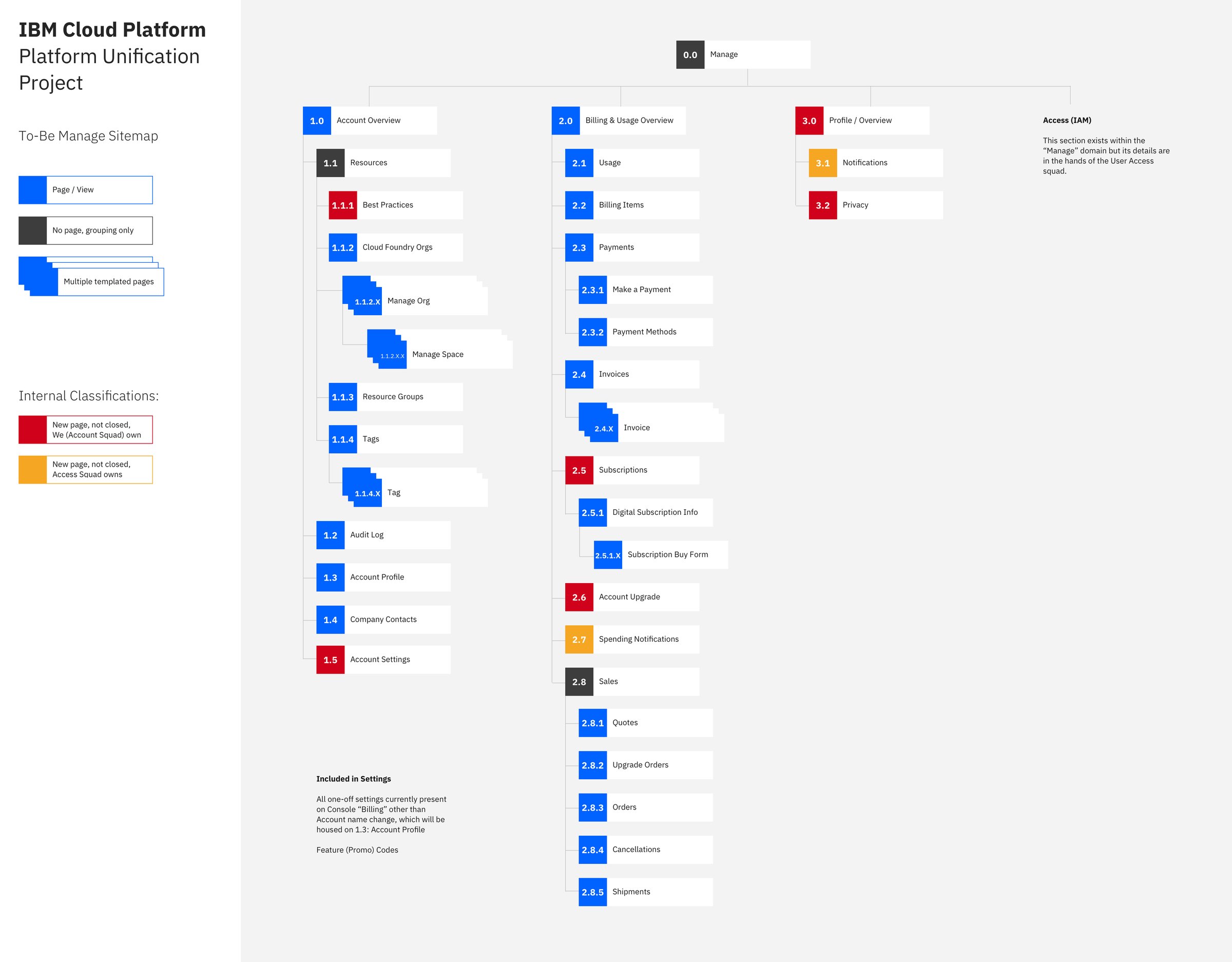
The PUP To-Be Manage sitemap. Four columns under a single Manage root: 1.0 Account Overview (with Resources, Best Practices, Cloud Foundry Orgs, Manage Org/Space, Resource Groups, Tags, Audit Log, Account Profile, Company Contacts, Account Settings), 2.0 Billing & Usage Overview (Usage, Billing Items, Payments, Invoices, Subscriptions, Account Upgrade, Spending Notifications, Sales: Quotes / Upgrade Orders / Orders / Cancellations / Shipments), 3.0 Profile / Overview (Notifications, Privacy), and a separate Access (IAM) column noted as owned by the Access squad. A legend explains the page-vs-grouping color coding and the squad-ownership classifications.
IBMCloudPlatform_PlatformUnificationProject_Account_ManageToBeSitemap_v1_4. The file name is doing some heavy lifting — versioned, scoped to one quadrant of the IA (Manage), labeled internal. This is the kind of artifact a team needs to align on before any pixel gets drawn.

The IA, in shipped form

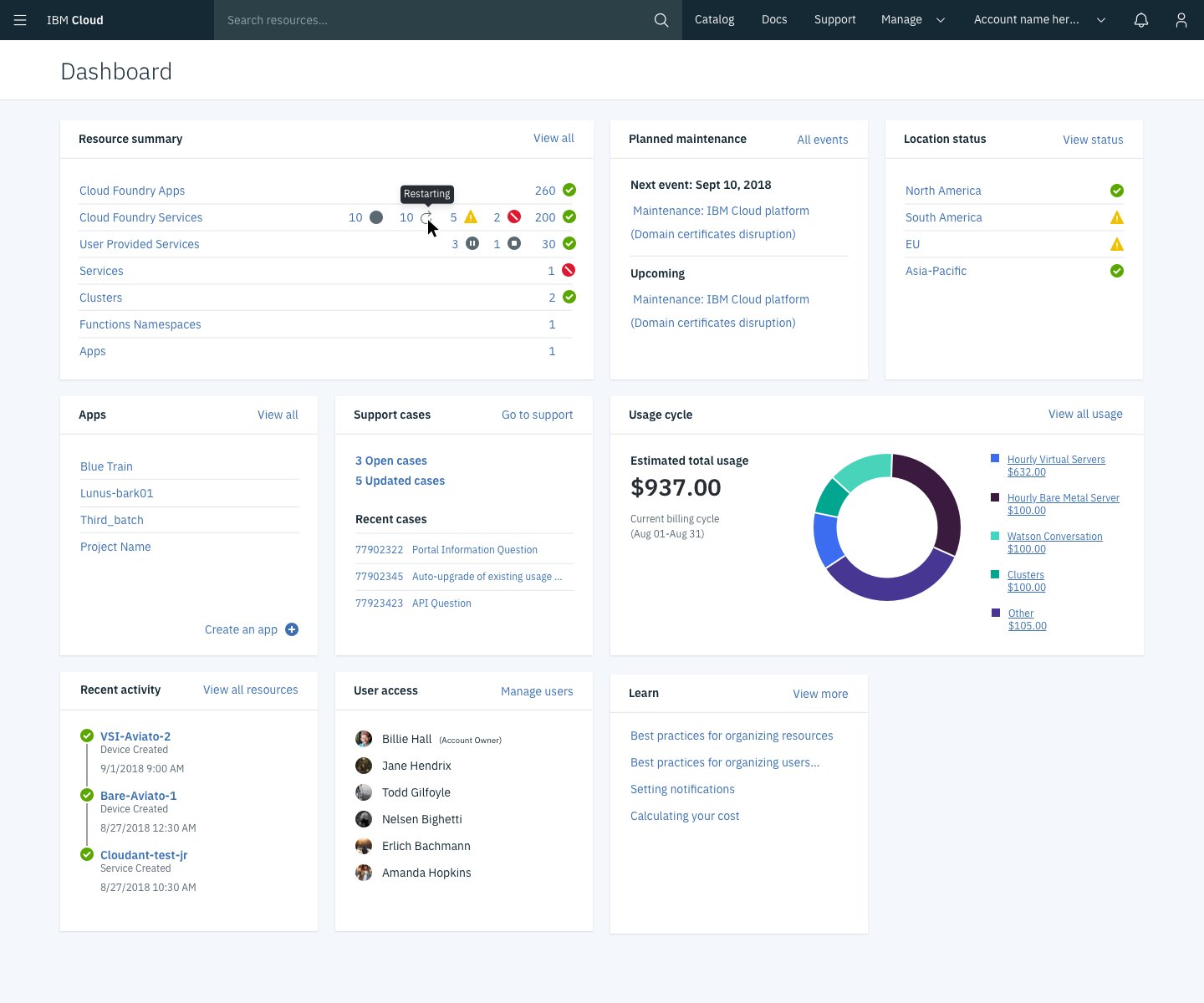
The sitemap above became these three sections of the unified product. Account Stuff · Money Stuff · Access Stuff — the three buckets that named the work — show up here as Account Overview, the unified Dashboard, and Manage Access.
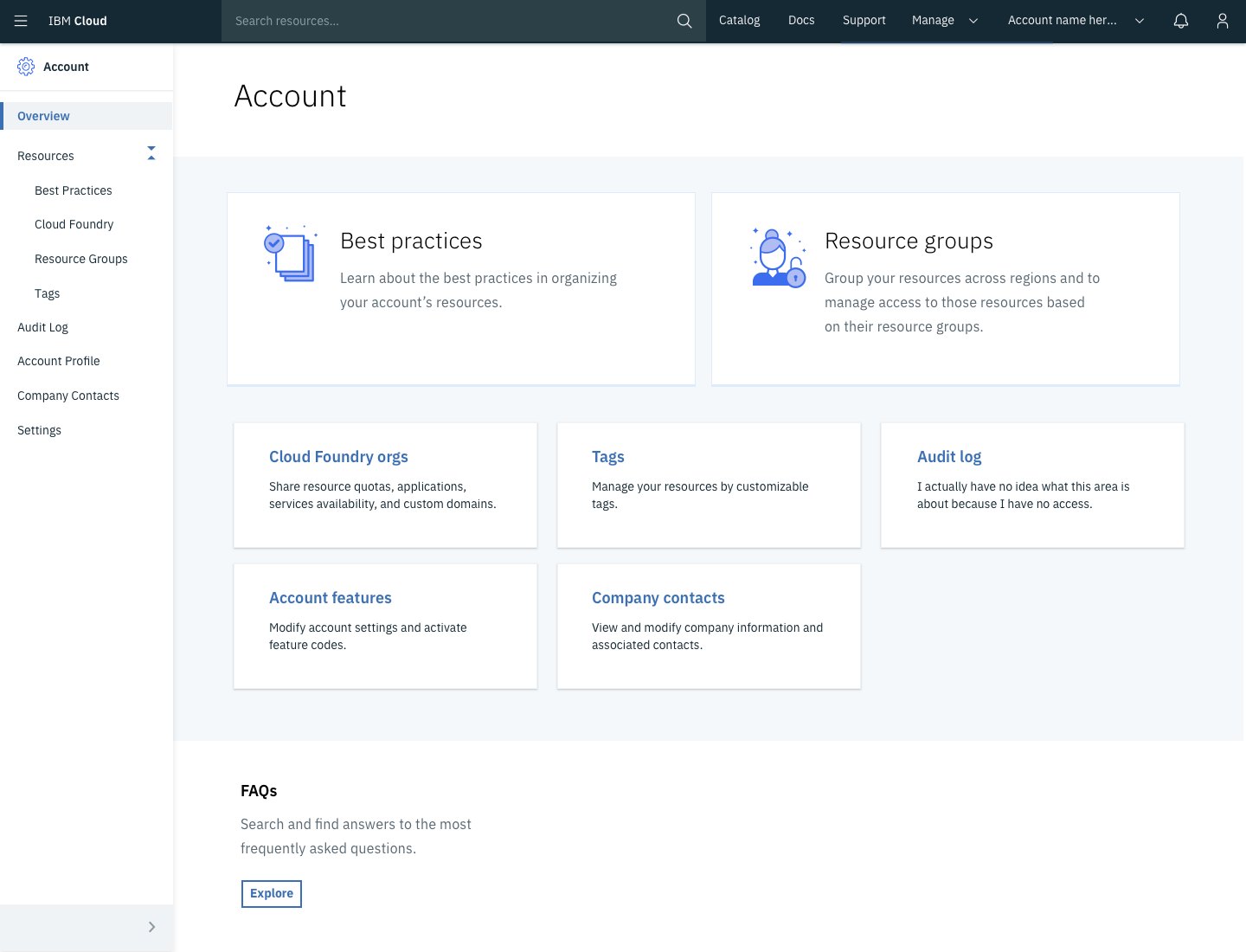
The unified Account Overview screen — left sidebar with Resources, Best Practices, Cloud Foundry, Resource Groups, Tags, Audit Log, Account Profile, Company Contacts, Settings. Main area with Best Practices and Resource Groups call-out cards, then Cloud Foundry orgs / Tags / Audit log / Account features / Company contacts in a six-card grid.
Account Stuff · the sitemap's first column, shipped
The unified Manage Resources dashboard — Resource summary, Planned maintenance, Location status across three regions, Apps section with View All, Support cases with two open, Estimated total usage of $937.00 with a donut chart, Recent activity, User access list, and a Learn panel.
Money & Resources · the unified dashboard partners pointed at
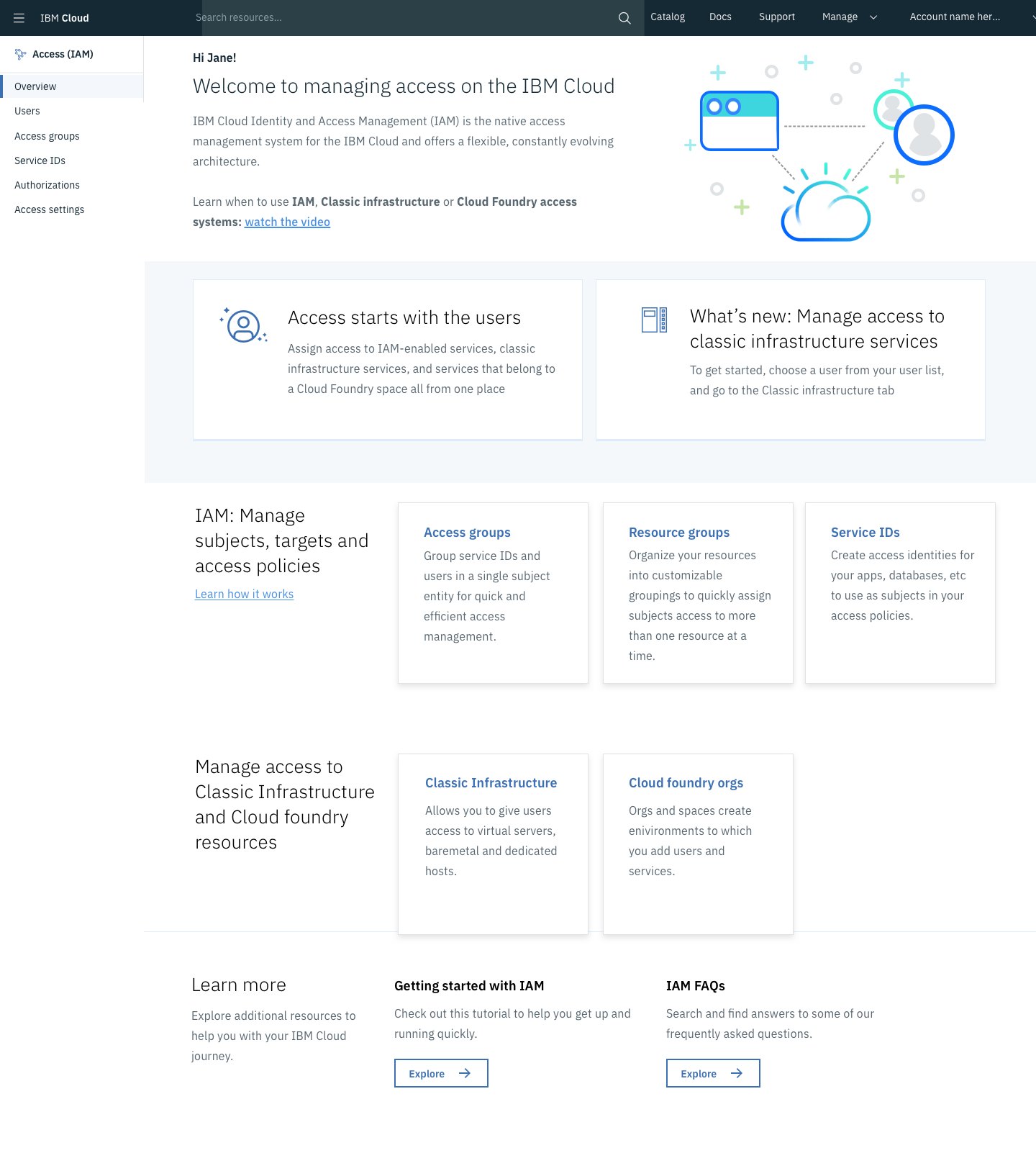
The IAM Manage Access overview — Welcome to managing access on the IBM Cloud. Tabs for Overview, Access groups, Service IDs, Authorizations, Access settings. Two big call-to-action cards (Access starts with the users; What's new: Manage access to classic infrastructure services). Three subsequent cards for Access groups, Resource groups, Service IDs. Then a Classic Infrastructure / Cloud foundry orgs section, then Learn more, Getting started with IAM, and an IAM FAQs panel.
Access Stuff · the Access squad's column, IA aligned
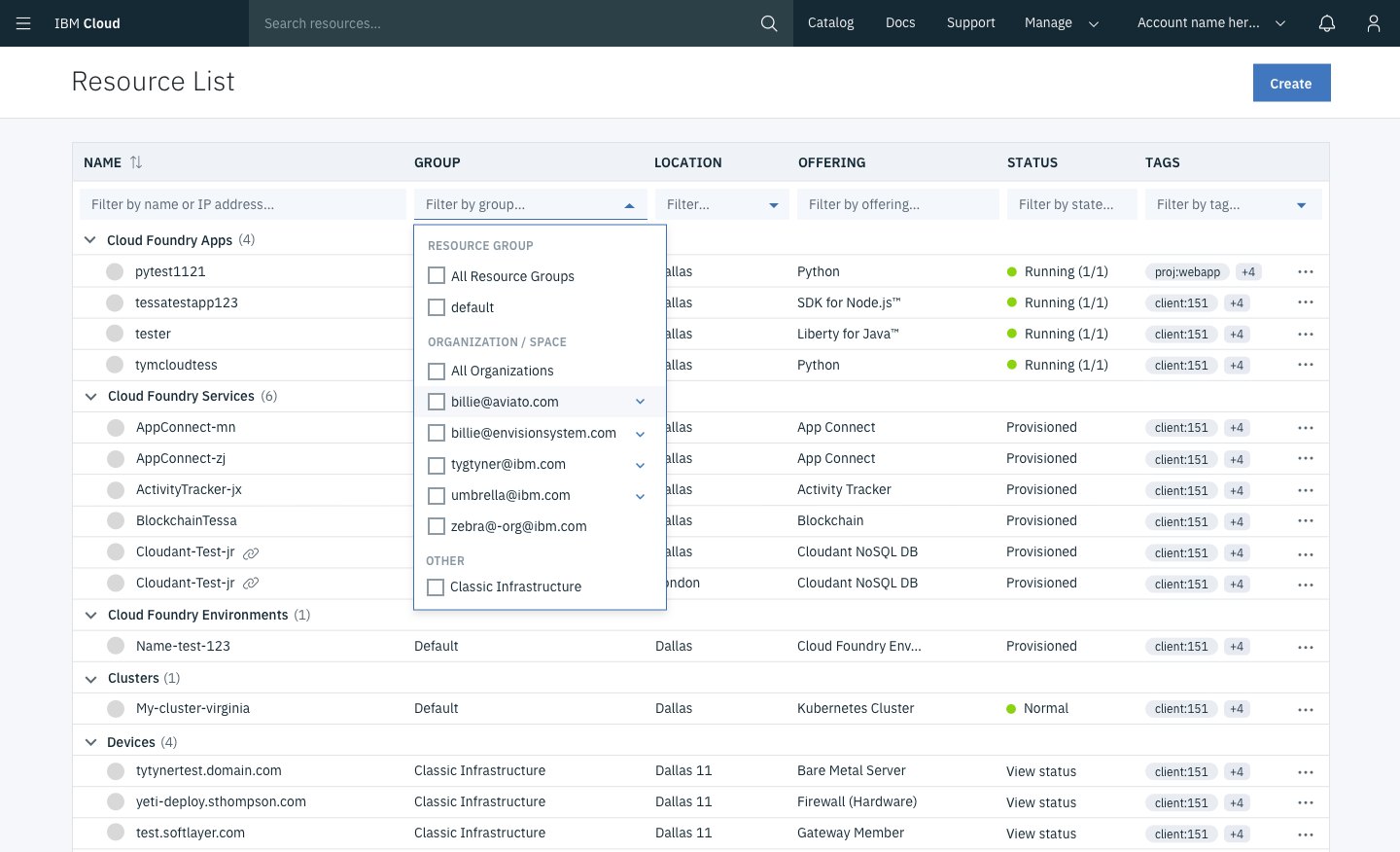
The unified Resource List — IBM Cloud header at top, a Resource List with Group filter dropdown open showing Resource Group options (All Resource Groups, Default, Organizations, AppConnect, billnnenovomvoxn.com, etc.), filterable by Name, Group, Location, Offering, Status, Tags. Resources are grouped under Cloud Foundry Apps, Cloud Foundry Services, Cloud Foundry Environments, Cluster categories with status pills.
Resource list · the unified browse, grouped + filterable by the new IA
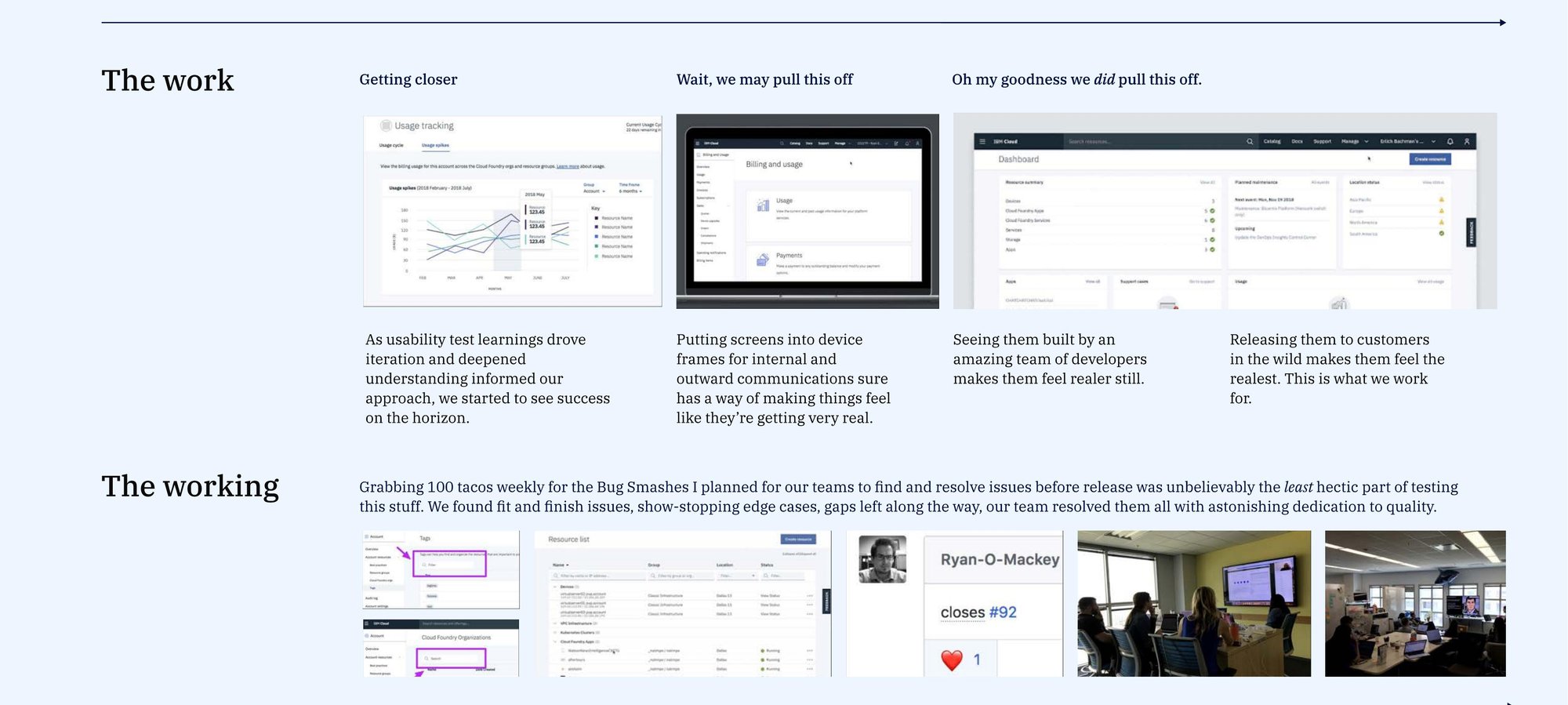
Progressing screenshots of the unified billing, usage, and resource dashboard, with the bug-smash and testing team shots that backed them.
Getting closer → “We may pull this off” → “Oh my goodness we did pull this off.“

The process, in chronological order

From an empty whiteboard to usability testing, our team was cranking to get this done both well and quickly: as-is audits, heuristic reviews, an IA recommendation, then iteration as usability test learnings drove understanding. Putting screens into device frames for internal and outward communications made the thing feel real. Seeing them built by an amazing dev team made them feel realer still. Releasing them to customers in the wild made them the realest. That’s what we work for.
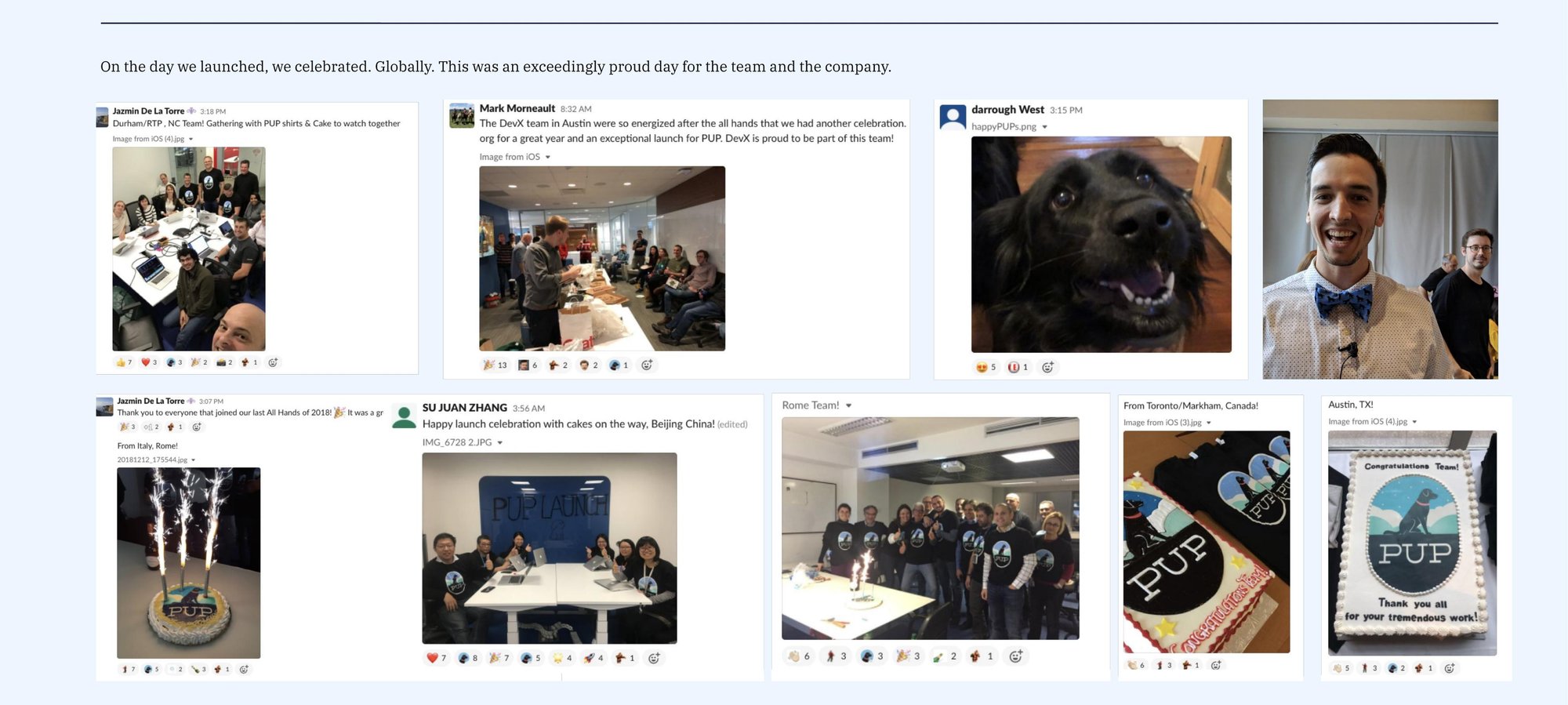
Photos from the global PUP launch celebration: cake, sparkler-topped cake, team shirts, group photos from offices around the world.
On the day we launched, we celebrated globally. Durham/RTP, Austin, Rome, Toronto/Markham, Beijing. Exceedingly proud day for the team and the company.
The Platform Unification Project delivered a complete transformation of the IBM Cloud experience for our users, bringing together resources and capabilities across Platform-as-a-Service and Infrastructure-as-a-Service within a unified, contemporary user experience. The innovation required to deliver this unified experience was enormous, with implications from the top of the stack all the way through black-end integration across complex and disparate business-critical systems. The result is a completely new way for users to experience IBM Cloud, with unification across discovery and provisioning of services, access and resource management and billing, a newly centralized support experience, and more. IBM’s description of the project (PUP, 2019 Stratus Award)
From his work on platform unification to navigation, IA, and Partner Center, Brendan has demonstrated design’s power to both innovate and align. Senior Designer, IBM Cloud platform Global Experiences / IA Guild

What it earned

  • IBM Corporate Technical Award — for impact on the IBM Cloud Platform Unification Project
  • IBM Outstanding Technical Achievement Award — also for PUP
  • 2019 Stratus Award for Cloud Computing — whole IBM Cloud platform design team

← All work